
AI Photo & Video Editor-Nebula
AILI TECHPhotography
2.213.00 Reviews
- Version
- 1.1.2
- Installs
- 50.00K
- Age Rating
- Teen
Screenshots
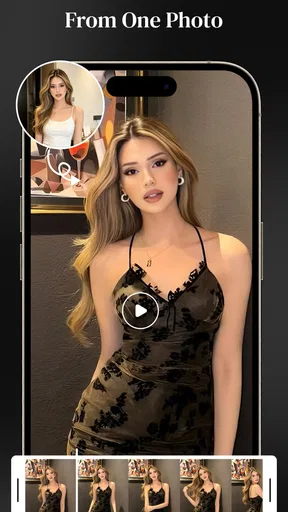
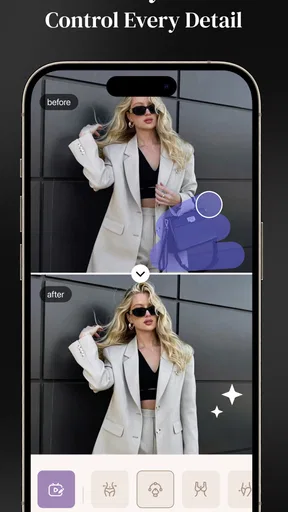
Our Review of AI Photo & Video Editor-Nebula
 Analysis by Appyee
I came away from AI Photo & Video Editor-Nebula with a mixed but fairly clear impression: it is an ambitious photography app that tries to cover several popular creative jobs in one place, yet its broad approach does not always feel as dependable as a focused editor. I like the idea of moving from a regular photo to a stylized image, a reshaped portrait, or a short dance-style video without changing apps. In practice, that convenience is most useful for casual social content and quick experiments rather than careful, professional editing.
The app comes from AILI TECH and is listed in the Photography category. It is free to install, with optional purchases ranging from $7.99 to $99.99 per item. That pricing detail matters because the free starting point makes it easy to explore, while the possible cost of advanced or repeated use can change the value calculation quickly. I would treat it as a creative playground first and a serious replacement for a dedicated photo editor only in limited situations.
What the editing experience is really good at
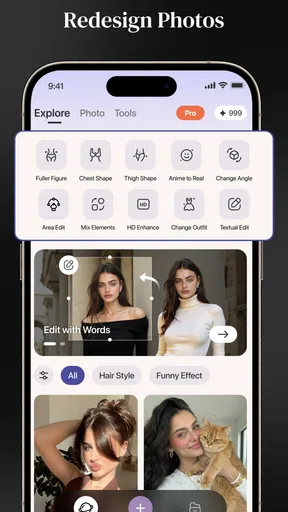
The main appeal is the combination of tools suggested by its design: adding words to images, changing the apparent shape of a body, and turning visual material into dance-oriented videos. Those are different creative tasks, and putting them together makes the app more interesting than a basic filter collection. I can imagine opening it when I have a portrait, a funny idea for a caption, and a desire to produce something more animated than a still image.
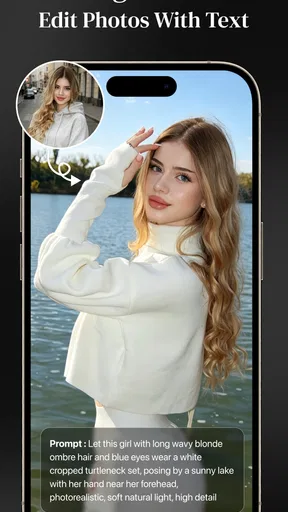
The text-editing side is likely to be the most immediately practical part for everyday users. A photo with a short phrase can become a greeting, announcement, joke, invitation, or social post without first passing through a separate design app. My advice is to begin with a simple image and a short message. Busy backgrounds, long sentences, and several competing visual elements can make quick edits look cluttered, especially when the goal is a readable result rather than an experimental one.
The body-reshaping concept is more sensitive. It can be useful when someone wants a subtle adjustment to a personal photo, but restraint is important. Strong transformations can make proportions look unnatural, bend nearby lines, or change the way clothing and surroundings appear. I would use small changes, inspect the entire frame, and compare the edited result with the original before sharing it. The best outcome is usually the one that looks like a normal photograph, not an obvious digital alteration.
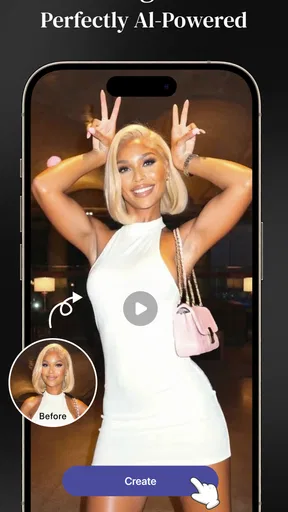
The dance-video angle gives the app a different kind of appeal. It is aimed at people who want a playful result without learning a full video editor. That makes it suitable for a quick birthday message, a lighthearted post, or a creative test with a single image. It is less suitable when timing, choreography, sound design, or detailed scene control matters. For those jobs, a dedicated video editor remains the better choice because it is built around a timeline and precise adjustments.
One useful workflow is to separate creation into stages instead of trying every effect at once. I would first choose the cleanest source photo, make any necessary crop or basic correction, then add the text or reshape the subject, and only afterward try the animated treatment. This order gives a better chance of spotting problems early. It also avoids wasting time polishing an image that later becomes unsuitable for the video effect.
Another practical tip is to keep an untouched copy of the original in the phone gallery. This is especially important for portrait edits. Once several changes have been layered together, it becomes harder to judge whether the result still looks natural. Keeping the original nearby lets me compare facial balance, body proportions, and background edges instead of relying on memory.
The app’s short store description is simply “Nebula,” while its broader summary points toward photo editing, body reshaping, and magic-style dance videos. That contrast tells me the product is being presented more as a compact creative concept than as a narrowly defined professional tool. I would not install it expecting the same depth as a dedicated retouching, typography, or video-production application.
Where it fits into a normal day
A realistic use case would be preparing a quick social post after taking a portrait at a gathering. I might crop the image, add a short caption, make a restrained adjustment to the subject, and then test the dance-video treatment for a more playful version. If the result looks good, I can choose between the still image and the animated interpretation. The value here is not perfect control; it is the speed of trying several directions from one starting point.
It can also suit someone who rarely edits photos and does not want to learn a complicated interface. A casual user may appreciate having several recognizable creative ideas in one app. The trade-off is that a beginner may also be unsure which effect is responsible for an unwanted change. When an image looks strange, I would undo one step at a time rather than stacking more effects in an attempt to fix it.
For text-heavy images, I would still compare the result with a design-focused alternative. Those apps usually provide more dependable control over alignment, spacing, typography, and layout. Nebula makes more sense when the text is only one part of a playful image, not when the entire success of the design depends on polished lettering.
For natural portrait retouching, a conventional photo editor may be safer. Manual tools take longer, but they let me decide exactly where an adjustment happens. An automated body effect can be convenient, yet convenience is not the same as precision. If the photograph is important or includes detailed architecture, patterned clothing, or multiple people, I would choose the more controlled route.
For video work, the same distinction applies. Nebula’s attraction is immediacy and novelty. A full video editor is preferable for trimming clips, arranging several scenes, controlling transitions, adjusting audio, or building a repeatable format. I would use this app for a quick visual gag or a spontaneous post, not as the center of a serious content workflow.
The limitation that affects the recommendation
The biggest concern is not that the app attempts too much; it is that users may expect each part to perform like a specialist tool. An all-in-one editor can be enjoyable, but every extra creative direction brings another opportunity for uneven results. A transformation that looks amusing on one portrait may look awkward on another. A text treatment that works on a bright background may be hard to read on a detailed one. A dance effect may feel entertaining once but less useful when a project needs refinement.
The optional purchase range also deserves attention. Since the app is free to start but offers items from $7.99 up to $99.99, I would explore the available workflow before committing money. A person who only wants occasional experiments may find the free experience sufficient, while someone planning frequent edits should decide whether the recurring value justifies the higher end of the purchase range. I would avoid paying simply because an effect looks interesting in the moment.
The average rating is 2.2 from around 64 ratings, with about 13 written reviews. That is a modest reception, so I would approach the app with realistic expectations rather than assuming every advertised creative idea will work smoothly for every image. The rating does not tell me which specific tool caused dissatisfaction, but it is enough to support a cautious trial before using the app for an important project.
It is also worth remembering that the content rating is Teen. That makes the app a better fit for older users and families who are comfortable with its portrait-editing and social-content direction. I would be particularly careful when younger users are experimenting with body reshaping, because repeated appearance editing can encourage unrealistic expectations. Used lightly, it can be a creative effect; used constantly, it can become an unhealthy standard for personal photos.
The current version is 1.1.2, and the app requires Android 7.0 or later. That minimum requirement covers many older Android devices, which is helpful for people who do not own a recent phone. Still, compatibility alone does not guarantee a smooth experience on every handset. Image and video processing can be demanding, so I would keep source files manageable and allow the app time to finish an effect instead of repeatedly tapping controls.
Who should try it, and who should skip it
I think Nebula is best for casual creators who enjoy trying visual effects, want a quick portrait adjustment, or like the idea of turning a still image into a more animated social post. It may also appeal to someone who wants one app for several simple experiments rather than separate tools for captions, retouching, and short-form visual content.
I would recommend it less strongly to photographers who care about preserving natural detail, designers who need exact typography, and video makers who depend on precise timing. Those users will probably become frustrated by the limits of an app designed around convenience and playful transformation. The same applies to anyone who wants a dependable batch workflow or a carefully repeatable visual style.
Before sharing an edited image, I would check three things: whether the text remains readable on another screen, whether the body adjustment has distorted nearby objects, and whether the animated result still represents the original person or scene respectfully. These checks take only a moment and address the most likely problems with this kind of editing. They are more valuable than adding another effect just because it is available.
I would also use a staged decision when considering an in-app purchase. First, test the app with several different source photos: a close portrait, a full-body image, and a busier background. Then see whether the results remain convincing beyond the ideal example. If the app only works well with one type of image, its value is narrower than it first appears. This is a better test than judging it from one successful edit.
After trying the main creative directions, my verdict is cautious rather than dismissive. The app has a distinctive idea: combine quick photo manipulation with expressive text and dance-style video creation. That combination can be fun, especially for spontaneous social content, and the free entry point lowers the barrier to experimentation. Its strongest quality is variety, not professional control.
At the same time, I would not make it my only photography tool. The low average rating, the broad feature emphasis, and the wide range of optional purchase prices all suggest that users should test the experience carefully. A focused alternative is likely better for serious retouching, polished layouts, or structured video editing. Nebula is most worthwhile when the goal is to play with an image and produce something quickly.
In short, I would tell a friend to try it if they enjoy creative effects and understand the need for moderation. Keep the original files, make subtle portrait changes, review the whole frame, and test the free experience before spending anything. If that sounds like the kind of workflow you want, this photography app may provide a convenient source of ideas. If you need accuracy and repeatable results, choose a specialist editor instead of expecting one playful app to do every job equally well.
With over 50 thousand installs, it has attracted a meaningful audience, but that alone would not change my recommendation. I would choose it for quick, experimental edits and skip it for professional or highly controlled work. Its best use is turning an ordinary photo into a light creative experiment, not replacing the tools built for precision.
Verdict
Strengths of AI Photo & Video Editor-Nebula
- AI tools create polished edits with minimal manual work.
- Supports creative effects for both photos and short videos.
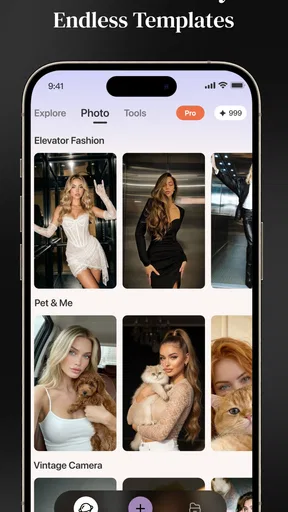
- Useful templates help speed up social media content creation.
- Simple interface makes basic editing accessible to beginners.
- Frequent creative updates can keep the editing experience fresh.
Limitations of AI Photo & Video Editor-Nebula
- Some advanced features may require a paid subscription.
- AI results can vary depending on image quality and lighting.
- Export options may be limited in the free version.
- Video processing can use significant battery and storage.
- Privacy details should be checked before uploading personal photos.
Similar Picks in This Category
View All
Google Photos
Google LLC4.4

Gallery
Google LLC4.2

Picsart AI Photo Editor, Video
PicsArt, Inc.3.9

B612 AI Photo&Video Editor
SNOW Corporation4.1

BeautyPlus-Selfie Photo Editor
PIXOCIAL TECHNOLOGY (SINGAPORE) PTE. LTD.4.5

Remini - AI Photo Enhancer
Bending Spoons4.1
Frequently Asked Questions
What is AI Photo & Video Editor-Nebula?
AI Photo & Video Editor-Nebula is a mobile editing app designed to enhance photos and create or adjust video content with artificial intelligence. It typically combines automatic improvements with creative tools such as filters, effects, background adjustments, retouching, templates, and other visual transformations. The exact tools available may vary by device, app version, subscription plan, and regional availability.
Is AI Photo & Video Editor-Nebula free to download and use?
The app may be available to download at no initial cost, but some advanced editing tools, premium effects, export options, or AI features can require in-app purchases or a subscription. Before confirming a trial or payment, carefully review the pricing page, renewal terms, and cancellation instructions shown in the app store or inside Nebula. Free features may also include advertising or usage limits.
Can beginners use AI Photo & Video Editor-Nebula easily?
Nebula is intended to make photo and video editing accessible, even for users without professional experience. AI-assisted tools can automate tasks that would otherwise require manual adjustments, while presets and templates help produce results quickly. Nevertheless, some features may take time to understand, especially when editing videos, combining multiple effects, adjusting intensity, or achieving a natural-looking result rather than an overly processed appearance.
Does AI Photo & Video Editor-Nebula require an internet connection?
An internet connection may be necessary for downloading the application, accessing cloud-based AI processing, loading templates, displaying advertisements, synchronizing content, or using certain premium effects. Basic editing tools may work offline, but this depends on the specific version and feature. If you plan to edit while traveling or without mobile data, test the required tools beforehand and keep any source media stored locally.
Is my personal content safe when using AI Photo & Video Editor-Nebula?
Before importing personal photos or videos, review Nebula’s privacy policy and the permissions requested by the app. Pay attention to whether media is processed on the device or uploaded to remote servers for AI editing, how long files are retained, and whether content may be used to improve services. Grant only necessary permissions, avoid uploading sensitive material, and use the app’s deletion or account-management options when available.
